How it works
Your child never sees a sign-up form, types a real name, or creates an account. There's exactly one grown-up step in the whole flow — here's all of it.
1. Pick a buddy
The first thing a child does is choose one of six animal mascots — fox, panda, owl, lion, elephant, or koala — and a randomly-generated nickname like "Sunny Fox." That's the entire "profile." Nothing about a real child's identity is ever asked for.






2. Hand the phone to a grown-up
Once a buddy's picked, one adult-facing step stands between here and playing: an email or phone number and a password start your free trial. This is the one part of NoodleTon that isn't purely local — it's how your subscription follows you across reinstalls — and it's about you, the parent, never something your child fills in or even sees.
3. Play across three hubs
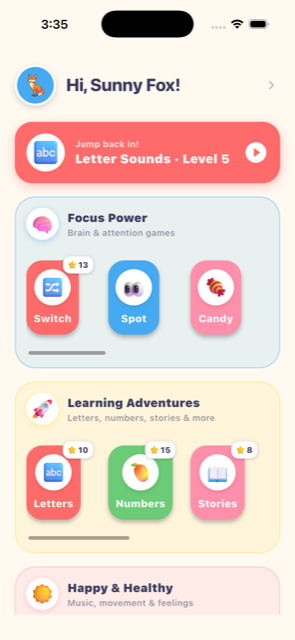
The home screen groups all 25 games into Focus Power (attention & brain training), Learning Adventures (letters, numbers, stories, world knowledge, writing, words), and Happy & Healthy (music, movement, feelings). A child always knows which "world" they're in.
4. Levels that actually change
Every game has up to 10 levels, and each one exists on purpose — easier content with more support early on, genuinely new material or a reversed challenge in the middle, and a mixed review pulling from everything learned so far at the end. Nothing is the same six flashcards reshuffled and called a new level.
5. Optional: join a class
A teacher can issue a class code so a device's progress syncs to a classroom view. This is entirely separate from your account and entirely optional — skipping it means your child's play history and profile stay local either way. Even when used, only an anonymous token, avatar, nickname, and aggregate stats sync — never individual answers or anything identifying.
6. Progress, for grown-ups only
Tucked behind a light "grown-ups only" check (a quick math question, not a password to remember), a parent can see session history, per-skill progress, and simple attention signals like typical session length. A child has no reason to ever open this screen, and it's never shown as pressure or a leaderboard.